I’m sure you’ve seen an influx of blogs using a combination of video, audio, text, images, and PDF’s to roll out the red carpet for their audience, but did you know that this is actually a secret trick that top bloggers and businesses utilize to get their blog post and website content to leap to the top of Google Search Results?
Yes, this mixed media experience they’re providing is actually bringing in more high-quality, targeted traffic and for bloggers that do it right, it’s explosive!
You see, the thing is…
Google really loves mixed media. And what they love even more than mixed media is when you embed a Youtube video within your blog post (but we’ll get to this killer hack in a second. First, lets talk about how Google actually judges the quality of your content).
Google wants to know whether or not people want to have a full blown relationship with you or if they’re just there to hit and quit.
What I really mean is, Google no longer cares about all that keyword stuff. Google cares about how valuable your content is and how your content is making the traffic they refer to you feel.
Google sees blogs with mixed media content as containing more value. And you know what media Google loves the most?
Well, that would be video.
Google sees video content as a premium experience for your audience showing preference for it over all media formats.
So much that…
Blog posts containing video are 53x more likely to rank on the first page of Google than those without.
The second thing that Google looks at is how sticky your blog is.
Are people staying around or are they leaving to find something else better? Google rewards blogs with low bounce rates because this means that the content that blog is producing is valuable and thus making their user base happy. See, the feels are important.
And if you want to supercharge your traffic, video is the way to go!
Not only will video help your blog post travel up Google’s rankings, but it will also help make your blog stickier because if someone’s watching video on your page, they’re hanging out for awhile, decreasing that bounce rate and Google likes that!
But if you’re going to use video, you can’t just throw any ol’ video in your blog post. The video should be optimized with the same keyword content that you use in your blog post, and it works best when it’s a Youtube video!
Why?
Because Google owns Youtube and Google shows preference to content that is created on platforms it owns.
Those who create videos on Youtube have a HUGE advantage in Google search over those who create videos on other platforms.
This advantage is so great, 8 out of 10 video results that appear under Google Web Search belong to Youtube.
If you aren’t using Youtube for Business, I cover all of the reasons why your Brand NEEDS A Youtube channel and cannot afford to skip out here.
In today’s post, I show you the exact steps you will need to take to optimize your blog post with video to boost your blog traffic!
HOW TO OPTIMIZE YOUR BLOG WITH VIDEO TO GROW YOUR BLOG TRAFFIC
Step 1: Optimize Your Youtube Video
There are several ways to optimize and infuse your Youtube video with keywords, and you need to do it in as many of these places as possible. Most importantly, the title, the description, the tag and the playlists.
- Title
- Description
- Tags
- Closed Captioning
- Playlists
So let’s say I was writing a blog post on How to Create Your own Kohl Eyeliner from Almonds. Here is how I would optimize a video to embed within that post.
Long-Tail Keyword Infused Titles
When you optimize your video title, you want to make sure your keywords are at the very beginning of your title. While a lot of people try to rank their content with 1-3 keywords, in actuality, you want to go deeper. You want your keywords to be long search queries. And I mean this, not just for videos, but your blog posts too.
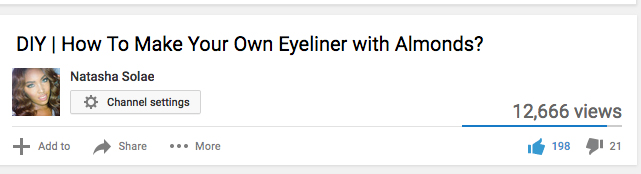
Here is an example from my passion Youtube channel using the long-tail keyword phrase: How To Make Your Own Eyeliner with Almonds.
Yes, that’s my phrase!
Not only is this my keyword phrase but it’s the title of the video. Adding DIY in the beginning was just my way of informing Youtube that this video belongs in the DIY section of Youtube.
Descriptions
Youtube video descriptions are one of the most underutilized areas, yet so many people sabotage their videos by leaving this section dry.
To create the perfect description, there are two things you need to do.
1. Infuse keywords into the first few lines of your description.
The first few lines of your Description are the most important because these lines are what actually come up in Youtube’s search engine results and Google’s Rich Media Data.
So what should the first few lines look like?
Well this isn’t the prettiest thing to do, but it’s seriously an OG hack that is still relevant.
Repeat your keyword three times at the beginning of the video.
I’m dead serious.
On this video, mine looks like this:
How To Make Almond Eyeliner | Kohl Eyeliner
How To Make Almond Eyeliner | Kohl Eyeliner
How To Make Almond Eyeliner | Kohl Eyeliner
You notice on the end I have Kohl Eyeliner. This is because Google is smart. If someone puts in How to Make Kohl Eyeliner, these individual words will be highlighted at the beginning of my video description in search.
I don’t have to literally spell out, “How to Make Almond Eyeliner” and “How to Make Kohl Eyeliner”.
What this hack does is it increases the keyword usage in your video description. And because Almond Eyeliner is essentially a substitute for making “Kohl” eyeliner at home, I wanted my target audience to find me under both.
You can pretty this up by actually writing out a description, but this trick is something I was taught by a couple of my friends that have over 1 million subscribers over Youtube. I’m happy I believed them, because my videos saw major boosts as a result.
2. The next thing you want to do is actually create a mini blog post for your video.
For every video you create, you want to have a 250 word synopsis of your video that is infused with keywords.
Now if this sounds like a lot, you should be writing a script for all your videos. If you write a script, it’s so easy to copy and paste the main beef in there, and just infuse it with keywords so that Google / Youtube sees your content as relevant to that search term.
Tip you may have missed: Infuse as many long-tail keywords as you can in your description.
I actually skipped out on doing this for this video because at the time I didn’t know better. While this video managed to get 12,000 views, the video that followed in which I added a description, actually ended up reaching 29,000 views! What a difference!
Tags
Next up, you will want to optimize your tags. The best way to approach tags is to think of every which way possible that people will search for content like yours.
So if your video is about wedding photography hacks, you even want to include things like spelling photagraphy like this because someone is bound to spell photography wrong when they’re looking for tips.
For this video, my tags moreso focused on all the different ways one would ask to make kohl eyeliner at home so I added both variations of kohl and almond eyeliner as well as things like gel and liquid liner.
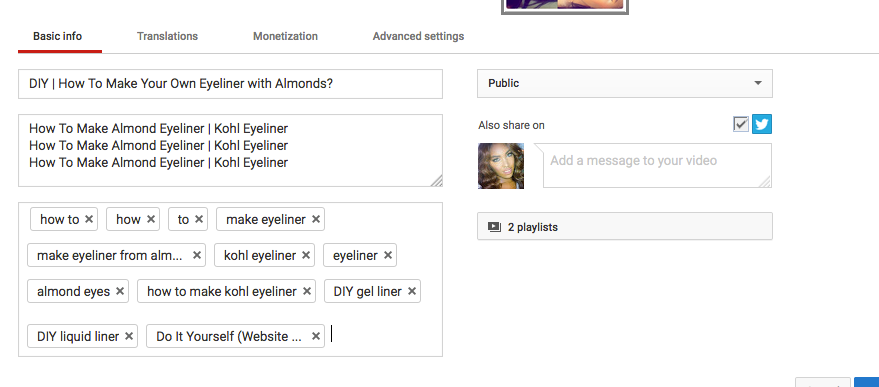
You definitely can, and probably should use more tags than I did. But whatever you do, your most important tags need to be at the very front. So leave things like your name and your brand to the very end.
Closed Captioning
While Youtube automatically offers closed captions for your video, it’s not something you should rely on. At the very least, you should have closed captions for your language, and even better if you can have closed captions for the language of the country in which you get the most traffic to your Youtube channel.
The reason why you don’t want to rely on Youtube’s captioning is because if a lot of time Youtube just gets it wrong. I may be a little harsh with this one because Youtube is quite good at this, but if you have an accent, slur your words, Youtube could translate your audio wrong.
But if you wrote your video script (which you should always be doing), this makes it easy to copy and paste into your video.
I actually kind of suck at remembering to do this…but I’m trying to get it together. I’m human people.
And lastly, but very important: PLAYLISTS, PLAYLISTS, PLAYLISTS!
Playlists are one of the most powerful tools on Youtube and another extremely underutilized area of Youtube.
Playlists matter because it allows you to do two things:
1. Add videos to keyword enriched playlists that are searchable on Youtube (keyword stuffing here can actually get you banned so don’t do it!)
You want actual descriptions here that tell your audience what they’re about to watch.
2. Every time you add a video to a playlist Youtube assigns it a new ID increasing your Youtube Upload Frequency and tricks Youtube into favoring you for being more active on their platform.
These factors matter for two reasons:
- Playlists give your video ANOTHER chance to be found!
- Youtube ranks channels higher that upload more frequency!
So why do we care about ranking higher on Youtube?
When your video moves up in Youtube ranking, it also boosts the ranking on Google. If your blog post contains this video jam-packed with this video / keyword juiciness, it actually helps your blogs ranking.
It can even help your blog rank under video results.
Step 2: Optimize Your Blog Post
Now that you have your video, it’s time to embed it in your blog post.
Here is the catch though. Google likes mixed media. So if you want this to be really effective, you will want to write a blog post and use your video as an added bonus to your blog post.
This works really easily as most people prefer video content, but some people still do like to read. So not only are you providing that red carpet treatment for your audience, but you’re also making Google really happy!
Struggling to get started with video content? Don’t know what video content you need to grow your blog and business? Download the FREE guide below!
Are you using mixed media on your website? What is stopping you from incorporating mixed media on your blog?